bjorn.now

Things I've Learned (TIL)

Things I want to remember and might help others. Quick discoveries from debugging sessions, neat tricks, useful commands, and so on.

28 August, 2026

Reset an IKEA Kajplats lightbulb by power cycling it 6 times and then leaving it on until it blinks, then it’ll be in pairing mode again. Thanks fishymanbits on Reddit!

Step by step:

  1. Turn off the bulb for 30s
  2. Power cycle 6 times; on until it lights up, off immediately, count “one one thousand”, repeat
  3. On the sixth on, leave it on and wait
  4. When the bulb blinks it’ll be in pairing mode again

Matter over Thread requires IPv6 on your local network, so if you can’t pair the IKEA Kajplats bulb that might be why.

I didn’t have IPv6 enabled, and my ISP doesn’t assign IPv6, so I used unique-local-ipv6.com to get a unique prefix. Configured it as static in my local network setup, alongside the IPv4 configuration, on my UniFi Dream Machine and then all my bulbs connected.

Now my niece is learning to pronounce English colors as she cycles my apartment through every shade of the rainbow 😁

24 April, 2026

03 April, 2026

When dolt’s journal is corrupted, dolt fsck --revive-journal-with-data-loss will truncate it back to the last valid record.

I found this error message when starting dolt up after upgrading the server: invalid journal record at offset 5831169: invalid journal record: CRC checksum does not match.

To recover, go to your dolt DB:

cd ~/.beads/shared-server/dolt/<db> \
  && dolt fsck --revive-journal-with-data-loss

It backs up the journal, truncates to the point it failed, and makes it possible to start the server again. In my case the db came back up with data loss. I did a bd dolt pull and it pulled in what I had pushed most recently, so nothing major was lost.

I’m guessing this happened because installing beads 1.0 also upgraded dolt. If you’re upgrading, it’s worth making sure you’ve done bd vc commit && bd dolt push in all repos beforehand. That means configuring a git remote first.
26 March, 2026

dolt’s shared server won’t pull until all databases on the server have committed changes, not just the beads project you’re pulling.

You’ll get Error 1105 (HY000): cannot merge with uncommitted changes and it’s confusing when the beads project you’re working in has autocommit on. The uncommitted changes are in a different project that’s also using the shared server.

The fix is to go through your other projects and commit their changes (or enable autocommit by adding dolt.auto-commit: "on" to .beads/config.yml). To find which databases have uncommitted changes:

query=$(bd sql "SHOW DATABASES" 2>/dev/null \
  | grep -v -E "^(Database|--|\(|dolt|information_schema|mysql)" \
  | while read db; do
      echo "SELECT '$db' as db, table_name, status FROM \`$db\`.dolt_status WHERE table_name != 'config'"
    done \
  | paste -sd'|' - | sed 's/|/ UNION ALL /g')
bd sql "$query"

For each project that shows up, go in and run bd vc commit -m 'Snapshot', and then you can pull again.

We’re ignoring changes to the config table because they don’t seem to matter for pulling.

23 March, 2026

You can manually clone a dolt database from its git remote when bd bootstrap or bd init won’t cooperate.

  1. bd dolt stop: stop the server in the git repo you’re restoring so you can operate on its database
  2. cd ~/.beads/shared-server/dolt: go to the shared dolt server (it’s .beads/dolt/beads otherwise, I think)
  3. rm -rf <prefix>: remove the DB if it exists already
  4. dolt clone git+ssh://[email protected]/user/repo.git <prefix>: clone it to your prefix
  5. cd - && bd ready: see if you can see the listing

I don’t know why my local just refused with bd bootstrap but this allowed me to fix it manually.

20 March, 2026

To switch beads from a per-project dolt server to the shared server, do a backup, configure shared-server, and restore.

I was running in “a server per repo” mode and it’s just unnecessary, they clash in annoying ways when switching repos, and once I understood how beads store data in git I embraced dolt and the shared server. I had hesitated because I had somehow connected it with DoltHub, and that’s optional for using beads.

  1. bd backup: make sure you have your local database available for restore
  2. bd dolt stop: so we don’t conflict on anything
  3. bd dolt set shared-server true: to configure this project to use the shared server
  4. bd restore: to restore the db

For most of my projects this just worked, but in some cases I had to reset the dolt configuration for the repo.

Beads with dolt store data in git refs, not branches, and won’t share it anywhere until you manually configure a remote.

After bd init, your dolt data only exists locally. You can check with bd dolt remote list which will show “No remotes configured.”

[… more]
til 1 min read #beads, #dolt

I tweak the default beads setup to work with Claude instead of the generic agent integration.

As of beads 0.62.0, this is what I run:

# configure agents later
bd init --shared-server --skip-agents

# setup a CLAUDE.md and configure claude hooks to re-prime beads
bd setup claude --project
bd hooks install

# move local settings to project settings
mv .claude/settings{.local,}.json

# amend init commit so .beads-credential-key never enters git
git add .claude/settings.json CLAUDE.md
git commit --amend -CHEAD

# share beads data alongside your git repo
bd dolt remote add origin git+ssh://[email protected]/you/repo.git
echo -e 'sync:\n  git-remote: git+ssh://[email protected]/you/repo.git' >> .beads/config.yaml

The key thing is --skip-agents and then bd setup claude --project instead, so you get Claude-specific hooks rather than the generic agent integration. The dolt remote lines are so your beads data gets stored alongside your git repo.

til Updated #beads

When beads can’t find or create a dolt database, delete the local dolt state and reinit.

The errors look like this:

Error: failed to open Dolt store: database "bs" not available after CREATE DATABASE: Error 1049 (HY000): database not found: bs

or:

Error: failed to open database: database "bs" not found on Dolt server at 127.0.0.1:3308
[… more]
til 1 min read #beads, #dolt

19 March, 2026

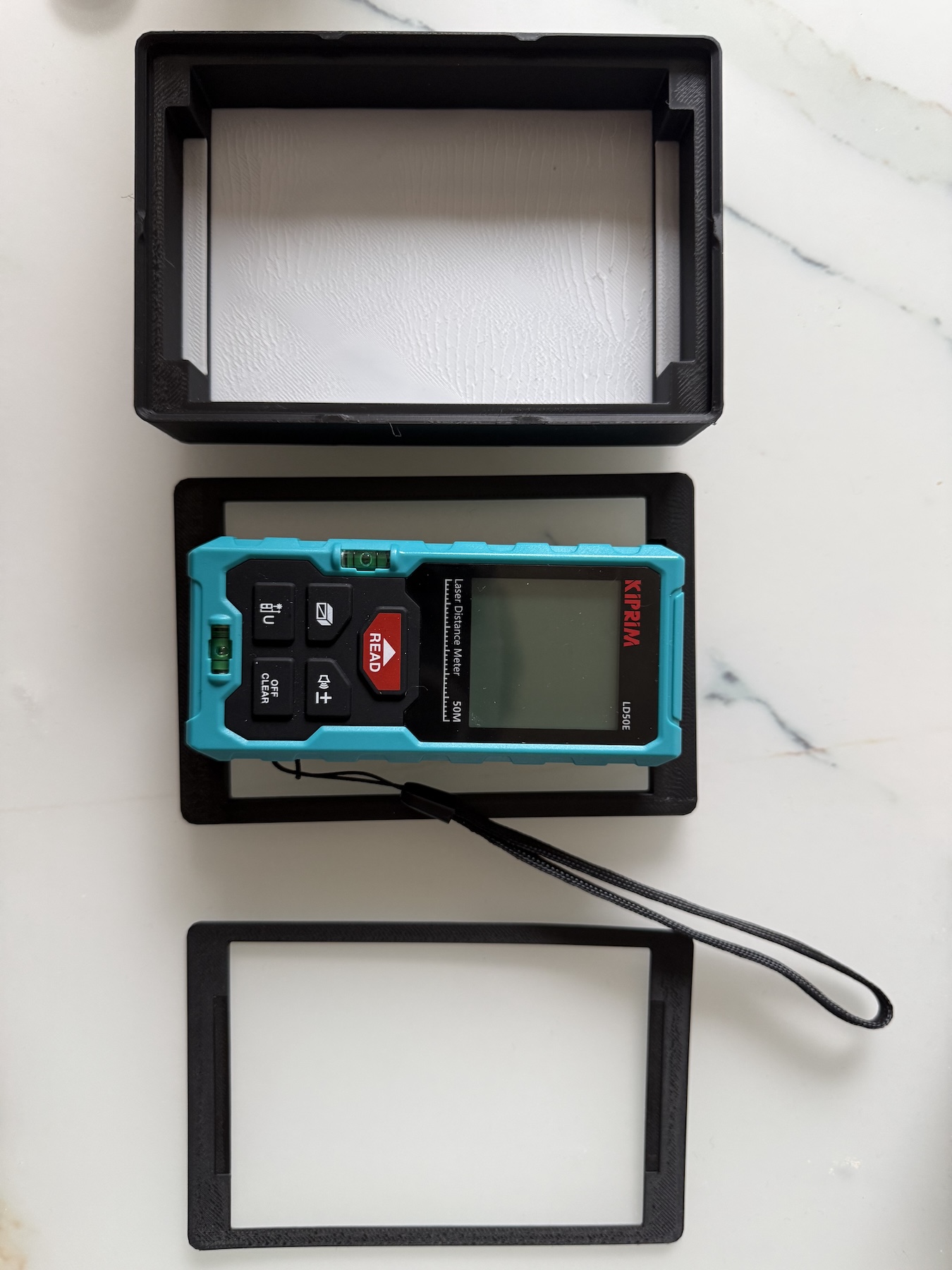
Start with the smallest test print you can, no, even smaller, when iterating on a 3D model.

Three 3D printed gridfinity bins in decreasing size, showing the iteration from full print to smallest possible test piece
  • Top: the first print, fully believing I had nailed everything on the first try (also some hope, it was printing over night so hey, it might mean I’m done with this first design)
  • Middle: second print, cut smaller but enough to let the device rest. Made me realize I hadn’t taken into account that the device tapers at the top and bottom, so it needs less living space
  • Bottom: latest print, cut to print as small as possible, and maybe too small, but it seems to indicate this is good. Next up, a full print

Next time, reverse the order 😅

01 March, 2026

git rm --cached <file> will remove a file from git’s tracking but leave it on the filesystem. Great if you accidentally commit something that should’ve been in .gitignore.

til #git

26 February, 2026

Use git config core.hooksPath script/hooks and it’ll use the scripts in script/hooks as hooks in the git project. Version controlled, and no need to update symlinks as scripts come and go.

[… more]
til 1 min read #git

28 January, 2026

Set GENERIC_TIMEZONE for n8n or you’ll get ERROR: You specified an invalid date. when you try to publish a time triggered workflow.

I had done a server migration and completely missed the .env file when copying, and after recreating it all started working.

til #n8n

10 January, 2026

Add commands to both permissions.allow and sandbox.excludedCommands to run them outside Claude Code’s sandbox by default, because allow grants permission to run at all and excludedCommands runs them unsandboxed.

{
  "permissions": {
    "allow": [
      "Bash(pnpm test:unit:*)",
      "Bash(pnpm test:e2e:*)"
    ]
  },
  "sandbox": {
    "excludedCommands": [
      "pnpm test:unit:*",    // Same commands, different purpose
      "pnpm test:e2e:*"
    ]
  }
}

Note: Tested with Claude Code v2.1.3

Write out colon subcommands explicitly for Claude Code permissions because test:* doesn’t match test:unit (prefix matching treats them as separate commands), and the fallback test* is too broad (matches testAndDestroyEnvironment).

For example:

{
  "permissions": {
    "allow": [
      "Bash(pnpm test:unit:*)", // Allows pnpm test:unit --arg etc.
      "Bash(pnpm test:e2e:*)",
      "Bash(pnpm test*)"        // ❌ <- will allow testAndDestroyEnvironment
    ]
  }
}

Note: Tested with Claude Code v2.1.3

04 November, 2025

Marking the content/ folder for your Hugo site as a “Source Root” in IntelliJ lets you use Path from Source Root to get the path to the file without the content/ prefix you don’t need when linking internally.

To make linking internally easier, I created an Alfred app snippet ({{< relref “{clipboard}” >}}), so now I only have to open the other post, double-tap shift, type “source root”, then run the snippet, and all linked up.

IntelliJ context menu showing Copy Path/Reference options with 'Path from Source Root' highlighted

Right-click folder → Mark Directory as → Sources Root.
To copy path: open file and search ‘source root’, or right-click → Copy Path/Reference → Path from Source Root

03 November, 2025

Use /@<name> to access the value of an attribute when you’ve selected an element with XPath.

With the expression //*[@class="published-at"] you will get the HTML tag that has class="published-at", and if you then want the datetime property you add /@datetime to get it.

26 October, 2025

Apple Notes can evaluate calculations with variables that update as you change them. The variable name has to be “one word,” so usual camelCase or PascalCase will likely do you best.

I realized this while trying to calculate what height TV bench I should get:

Apple Notes calculations determining TV bench height using variables for TV size, sofa height, and eye level

The center of the TV should be about eye level, so what height bench should I get given myself and the sofa? Seems around 60cm will be good. Update: I realized the TV stand adds to the height of the TV bench, so it shouldn’t be part of the center of TV calculation.

[… more]
til Updated 2 min read #macos, #productivity

09 October, 2025

Don’t quote regex patterns in Bash [[ ]] tests, because they’ll match literally.

So the below won’t match because it’s looking for a literal $ in the string, instead of matching at the end of the string:

file="https://example.com/blog-post/index.html"
[[ "$file" =~ "/index.html$" ]] && echo MATCH

But this will:

file="https://example.com/blog-post/index.html"
[[ "$file" =~ /index\.html$ ]] && echo MATCH

Note: [[ ]] is a Bash extension of the test command that supports regexes (among other things). The [ ] is the POSIX standard test (see man test), so [[ ]] features may not work in other shells or in limited shells like ash or sh.

[… more]
til 1 min read #bash, #regex, #shell-scripting